Show Judge.me reviews and set up product pages
Connect Judge.me to show ratings and reviews natively in your app, and choose what product pages show.
Product page options live on Settings, in the Product page and Judge.me reviews sections.
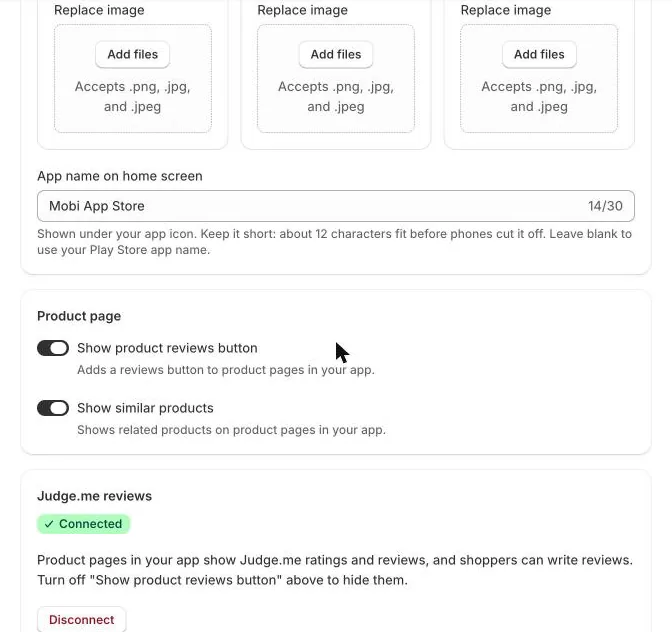
Product page options
- Show product reviews button: adds a reviews button to product pages.
- Show similar products: shows related products further down the product page.
Connect Judge.me
If you collect reviews with Judge.me, your app can show them natively (star ratings and review lists) and let shoppers write reviews without leaving the app.
- In Judge.me, go to Settings → Integrations → View API tokens and copy the Private API token.
- In Casa Mobile App Builder, open Settings → Judge.me reviews, paste the token and click Connect Judge.me.
- The section shows Connected. Product pages in your app now show Judge.me ratings and reviews.
New reviews written in the app follow your Judge.me moderation settings, so they're published when Judge.me would publish them. Only published reviews appear in the app, and reviewers' email addresses are never shown.
Your token stays on our servers and is never sent to the app. To stop showing reviews, click Disconnect, or turn off Show product reviews button.
TipWithout Judge.me, the reviews button opens the product's page on your website, so shoppers can still read reviews there.
Next articleShow Casa Loyalty points and rewards →