Preview your app on your phone
Load your store in our demo app with a six-character access code to try it before you publish.
The preview in the builder is an approximation. To try the real app, with your products, cart and checkout, load your store in our demo app.
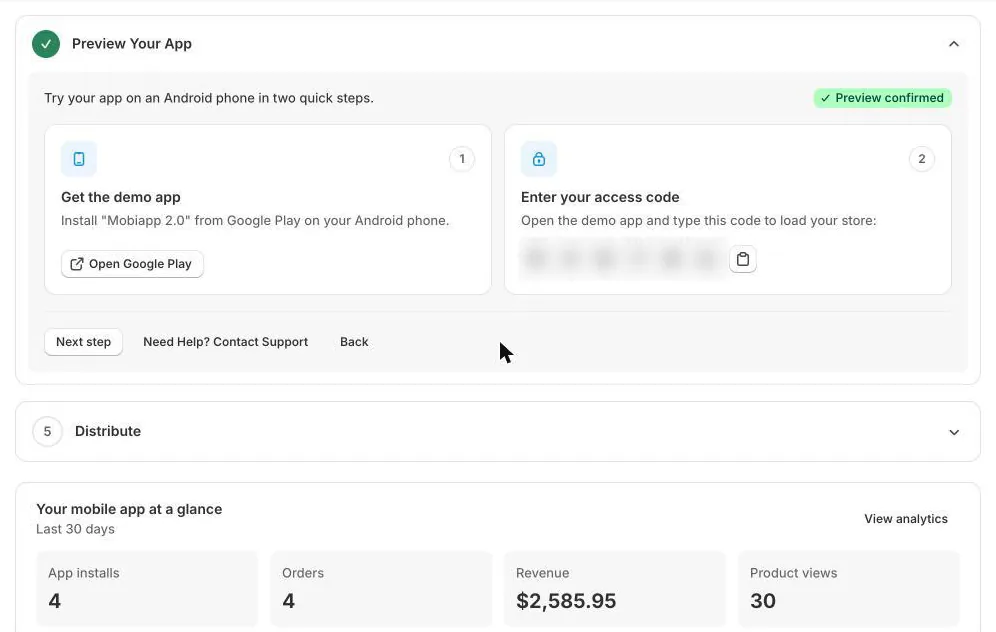
- On the Dashboard, open the Preview Your App step.
- Click Open Google Play and install Mobiapp 2.0 on your Android phone.
- Open the demo app and type the six-character access code shown on the Dashboard. Use the copy button next to the code if you're on the same device.
- Your store loads in the app. Browse, add to cart and go through checkout as a customer would.
Design changes you save in the builder show up in the demo app the next time you open it or refresh the home screen.
TipKeep your access code to yourself and people you trust: anyone with it can load your store in the demo app.
ImportantThe demo app is for previewing only. Push notifications and your own app name and icon appear only in your published app.
Next articleSend push notifications →